
Autenticação Digest
Para utilizarmos a atenticação Digest devemos saber como ele funciona. Ao contrário
da autenticação Basic, a autenticação Digest não envia a senha em texto puro pelo meio.
A Autenticação Digest é um mecanismo de autenticação simples desenvolvido originalmente para o protocolo HTTP
que está descrito na RFC2671.
O cliente envia um requisição à um conteúdo, que requer autenticação, sem fornecer usuário e senha. Ex.:
GET /api/hello HTTP/1.1
Host: localhost:8080
Neste caso acessamos o conteúdo (path) /api/hello pelo método GET. O servidor responde com 401 Unauthorized
e gera um desafio digest e o envia para o cliente.
HTTP/1.1 401 Unauthorized
Server: Apache-Coyote/1.1
WWW-Authenticate: Digest realm="MyRealm", qop="auth", nonce="MTQyNDY1MDM4MTY2MDo3YmQ4NjFlYmQwNWNhYzZmMjE3YTBjYmUzNzc0YjdlMg=="
Content-Type: application/json;charset=UTF-8
Date: Sun, 22 Feb 2015 23:53:01 GMT
Não tenho a pretensão de ser um guia definitivo sobre autenticação Digest, por isso não vou explicar cada parâmetro
enviado no HEADER. Esses parâmetros são usados na resposta ao desafio. (Para mais informações sobre os
parâmetros acessar o site RFC2671 ).
O nonce é uma string gerada pelo servidor toda vez que lança um desafio. Deve ser única, ou seja, não deve ser
repetido. No Spring Security o nonce é gerado da seguinte maneira:
long expiryTime = System.currentTimeMillis() + (nonceValiditySeconds * 1000);
String signatureValue = DigestAuthUtils.md5Hex(expiryTime + ":" + key);
String nonceValue = expiryTime + ":" + signatureValue;
String nonceValueBase64 = new String(Base64.encode(nonceValue.getBytes()));
Com base no nonce devemos enviar a resposta pelo HEADER do HTTP:
Authorization: Digest username="cadocruz", realm="MyRealm", nonce="MTQyNDY1MDM4MTY2MDo3YmQ4NjFlYmQwNWNhYzZmMjE3YTBjYmUzNzc0YjdlMg==", uri="/api/hello", response="94785d1c6feae05bbc8e8d47590224a7", qop=auth, nc=00000001, cnonce="0a4f113b"Note o paramêtro response, é neste parâmetro que devemos passar a resposta pelo HEADER, o response é
calculado da seguinte maneira:
A1 = MD5(username ":" realm ":" passwd)
A2 = MD5(method ":" uri)
response = MD5(A1:nonce:nc:cnonce:qop:A2)
Com base nesses dados vamos à nossa aplicação.
Spring Boot
O Spring Boot é um projeto com o conceito de “convenção sobre configuração”, tornando a configuração do
ambiente muito mais rápida e simples.
Você pode aprender um pouco mais sobre o Spring Boot na página de referência do próprio
Spring Boot.
Um jeito simples de criar um projeto do Spring Boot é pelo site Spring Initializr,
é só você configurar como será sua aplicação e as depêndencias dela, e gerar o projeto.
Estou usando o Gradle ao invés do Maven, mas você pode usar o maven se quiser.
O arquivo build.gradle da nossa aplicação ficou assim:
buildscript {
    ext {
        springBootVersion = '1.2.1.RELEASE'
    }
    repositories {
        mavenCentral()
    }
    dependencies {
        classpath("org.springframework.boot:spring-boot-gradle-plugin:${springBootVersion}")
    }
}

apply plugin: 'java'
apply plugin: 'eclipse-wtp'
apply plugin: 'spring-boot'
apply plugin: 'war'

war {
    baseName = 'spring-security-digest'
    version = '0.0.1-SNAPSHOT'
}
sourceCompatibility = 1.8
targetCompatibility = 1.8

repositories {
    mavenCentral()
}

configurations {
    providedRuntime
}

dependencies {
    compile("org.springframework.boot:spring-boot-starter-security")
    compile("org.springframework.boot:spring-boot-starter-web")
    compile("org.springframework.boot:spring-boot-starter-data-rest")
    providedRuntime("org.springframework.boot:spring-boot-starter-tomcat")
    testCompile("org.springframework.boot:spring-boot-starter-test")
}

eclipse {
    classpath {
         containers.remove('org.eclipse.jdt.launching.JRE_CONTAINER')
         containers 'org.eclipse.jdt.launching.JRE_CONTAINER/org.eclipse.jdt.internal.debug.ui.launcher.StandardVMType/JavaSE-1.8'
    }
}

task wrapper(type: Wrapper) {
    gradleVersion = '1.12'
}
O coração do Spring Boot é nosso SpringSecurityDigestApplication.
@SpringBootApplication
@ComponentScan("br.com.cadocruz")
public class SpringSecurityDigestApplication {

    public static void main(String[] args) {
        SpringApplication.run(SpringSecurityDigestApplication.class, args);
    }
}
Pronto, já temos nossa aplicação rodando com o mínimo de segurança.
Spring Security
Diferentemente da autenticação Basic, na autenticação Digest o Spring Security não provê
uma configuração “automática”, então teremos que definir manualmente nossos DigestAuthenticationEntryPoint
e DigestAuthenticationFilter.
@Configuration
@EnableWebMvcSecurity
public class SecurityConfig extends WebSecurityConfigurerAdapter {

	protected void configure(HttpSecurity http) throws Exception {
		http
			.sessionManagement().sessionCreationPolicy(SessionCreationPolicy.STATELESS).and()
			.authorizeRequests()
				.antMatchers("/api/**").authenticated()
			.and().exceptionHandling()
			.authenticationEntryPoint(digestEntryPoint());
		http.csrf().disable();
		http.addFilter(digestAuthenticationFilter(digestEntryPoint()));
	}

	protected void configure(AuthenticationManagerBuilder auth)
			throws Exception {
		auth.inMemoryAuthentication().withUser("cadocruz").password("12345678")
				.authorities("ROLE_USER").and().withUser("admin")
				.password("12345678").authorities("ROLE_USER", "ROLE_ADMIN");
	}

	@Bean
	public DigestAuthenticationEntryPoint digestEntryPoint() {
		DigestAuthenticationEntryPoint digestAuthenticationEntryPoint = new DigestAuthenticationEntryPoint();
		digestAuthenticationEntryPoint.setKey("mykey");
		digestAuthenticationEntryPoint.setNonceValiditySeconds(120);
		digestAuthenticationEntryPoint.setRealmName("MyRealm");
		return digestAuthenticationEntryPoint;
	}

	public DigestAuthenticationFilter digestAuthenticationFilter(
			DigestAuthenticationEntryPoint digestAuthenticationEntryPoint)
			throws Exception {
		DigestAuthenticationFilter digestAuthenticationFilter = new DigestAuthenticationFilter();
		digestAuthenticationFilter
				.setAuthenticationEntryPoint(digestEntryPoint());
		digestAuthenticationFilter
				.setUserDetailsService(userDetailsServiceBean());
		return digestAuthenticationFilter;
	}

	@Override
	@Bean
	public UserDetailsService userDetailsServiceBean() throws Exception {
		return super.userDetailsServiceBean();
	}

}- Algumas considerações:
- Toda requisição para /api deve ser autenticada
- Desabilitamos o HTTP Session.
- Desabilitamos a proteção contra CSRF (Cross-site Request Forgery) para simplificar o desenvolvimento, mas você pode ler mais sobre proteção CSRF aqui.
No método digestEntryPoint() configuramos nossa chave privada, o tempo de expiração do nonce em segundos (o valor padrão é 300 segundos) e o nosso realm. Esses são parâmetros obrigatórios.
Vamos agora para nosso @RestController, ele não tem nada de mais. Mapeamos nosso controller para /api e nosso método
hello como /hello.
@RestController
@RequestMapping("/api")
public class HelloController {

	@RequestMapping(value = "/hello", method = RequestMethod.GET, produces = MediaType.APPLICATION_JSON_VALUE)
	public ResponseEntity<HelloMessage> hello(Principal principal) {
		return new ResponseEntity<HelloMessage>(new HelloMessage("Hello, "
				+ principal.getName() + "!"), HttpStatus.OK);
	}

	class HelloMessage {
		private String message;

		public HelloMessage(String message) {
			this.message = message;
		}

		public String getMessage() {
			return message;
		}
	}
}
Vamos testar nossa aplicação usando o cURL, sem providenciar as credenciais de segurança:
curl -i http://localhost:8080/api/helloComo esperado, recebemos como resposta o código de status 401 Unauthorized.
HTTP/1.1 401 Unauthorized
Server: Apache-Coyote/1.1
X-Content-Type-Options: nosniff
X-XSS-Protection: 1; mode=block
Cache-Control: no-cache, no-store, max-age=0, must-revalidate
Pragma: no-cache
Expires: 0
X-Frame-Options: DENY
WWW-Authenticate: Digest realm="MyRealm", qop="auth", nonce="MTQyNDc0MTA5NDYzNzpiMGRhMjZlNzgxNWEyYWIwOGQ1ZDllMWVhYTg3NDU1Ng=="
Content-Type: application/json;charset=UTF-8
Transfer-Encoding: chunked
Date: Tue, 24 Feb 2015 01:04:54 GMT

{"timestamp":1424739894638,"status":401,"error":"Unauthorized","message":"Full authentication is required to access this resource","path":"/api/hello"}
Agora vamos passar o usuário e senha para nossa aplicação:
curl -i --digest --user cadocruz:12345678 http://localhost:8080/api/helloA primeira resposta do servidor ainda é 401 Unauthorized, mas o desafio agora é interpretado e enviado em um segundo request, que irá ter sucesso com 200 OK:
HTTP/1.1 401 Unauthorized
Server: Apache-Coyote/1.1
X-Content-Type-Options: nosniff
X-XSS-Protection: 1; mode=block
Cache-Control: no-cache, no-store, max-age=0, must-revalidate
Pragma: no-cache
Expires: 0
X-Frame-Options: DENY
WWW-Authenticate: Digest realm="MyRealm", qop="auth", nonce="MTQyNDc0MTcxMzA3NDpiMWVkOTU3YWMxNGYzMGYwYzljMDVmZDA2ZDA2MDI1Zg=="
Content-Type: application/json;charset=UTF-8
Transfer-Encoding: chunked
Date: Tue, 24 Feb 2015 01:15:13 GMT

HTTP/1.1 200 OK
Server: Apache-Coyote/1.1
X-Content-Type-Options: nosniff
X-XSS-Protection: 1; mode=block
Cache-Control: no-cache, no-store, max-age=0, must-revalidate
Pragma: no-cache
Expires: 0
X-Frame-Options: DENY
Content-Type: application/json;charset=UTF-8
Transfer-Encoding: chunked
Date: Tue, 24 Feb 2015 01:15:13 GMT

{"message":"Hello, cadocruz!"}
O cliente pode enviar o Authorization header já no primeiro request, e evitar o desafio de segurança do segundo request.
Agora que já temos nosso serviço RESTful funcionando, vamos criar nossa página de login (index.html) que consumirá nosso serviço usando a autenticação Digest.
<!DOCTYPE html>
<html lang="en">
  <head>
    <meta charset="UTF-8" />
    <title>Login Page</title>
  </head>
  <body>
    <div>
       <fieldset>
           <legend>Please Login</legend>
           <label for="username">Username</label>
           <input type="text" id="username" name="username"/>
           <label for="password">Password</label>
           <input type="password" id="password" name="password"/>
           <div class="form-actions">
               <button type="button" id="btLogin">Log in</button>
           </div>
       </fieldset>
    </div>
  </body>
</html>
Nada de mais na nossa página, um campo para usuário e outro para senha. O serviço “sujo” deve ser feito por um
javascript fazendo requisição por AJAX. Nós mesmo podemos criar nosso javascript, mas com certeza alguém já fez.
Pesquisando “ajax digest auth” no google, o terceiro resultado é do Marcin Michalski ‘s Weblog, pegarei este como exemplo:
/*
 * A JavaScript implementation of the Digest Authentication
 * Digest Authentication, as defined in RFC 2617.
 * Version 1.0 Copyright (C) Maricn Michalski (https://marcin-michalski.pl)
 * Distributed under the BSD License
 *
 * site: https://arrowgroup.eu
 */

$.Class("pl.arrowgroup.DigestAuthentication", {
 MAX_ATTEMPTS : 1,
 AUTHORIZATION_HEADER : "Authorization",
 WWW_AUTHENTICATE_HEADER : 'WWW-Authenticate',
 NC : "00000001", //currently nc value is fixed it is not incremented
 HTTP_METHOD : "GET",
 /**
  * settings json:
  *  - onSuccess - on success callback
  *  - onFailure - on failure callback
  *  - username - user name
  *  - password - user password
  *  - cnonce - client nonce
  */
 init : function(settings) {
   this.settings = settings;
 },
 setCredentials: function(username, password){
   this.settings.username = username;
   this.settings.password = password;
 },
 call : function(uri){
   this.attempts = 0;
   this.invokeCall(uri);
 },
 invokeCall: function(uri,authorizationHeader){
   var digestAuth = this;
   $.ajax({
         url: uri,
         type: this.HTTP_METHOD,
         beforeSend: function(request){
          if(typeof authorizationHeader != 'undefined'){
          request.setRequestHeader(digestAuth.AUTHORIZATION_HEADER, authorizationHeader);
          }
         },
         success: function(response) {
          digestAuth.settings.onSuccess(response);
         },
         error: function(response) {
          if(digestAuth.attempts == digestAuth.MAX_ATTEMPTS){
      digestAuth.settings.onFailure(response);
      return;
      }
          var paramParser = new pl.arrowgroup.HeaderParamsParser(response.getResponseHeader(digestAuth.WWW_AUTHENTICATE_HEADER));
          var nonce = paramParser.getParam("nonce");
          var realm = paramParser.getParam("realm");
          var qop = paramParser.getParam("qop");
          var response = digestAuth.calculateResponse(uri, nonce, realm, qop);
          var authorizationHeaderValue = digestAuth.generateAuthorizationHeader(paramParser.headerValue, response, uri);
          digestAuth.attempts++;
          digestAuth.invokeCall(uri, authorizationHeaderValue);
         }
     });
 },
 calculateResponse : function(uri, nonce, realm, qop){
   var a2 = this.HTTP_METHOD + ":" + uri;
   var a2Md5 = hex_md5(a2);
   var a1Md5 = hex_md5(this.settings.username + ":" + realm + ":" + this.settings.password);
   var digest = a1Md5 + ":" + nonce + ":" + this.NC + ":" + this.settings.cnonce + ":" + qop + ":" +a2Md5;
   return hex_md5(digest);
 },
 generateAuthorizationHeader : function(wwwAuthenticationHeader, response, uri){
   return wwwAuthenticationHeader+', username="'+this.settings.username+'", uri="'+
      uri+'", response="'+response+'", nc='+
      this.NC+', cnonce="'+this.settings.cnonce+'"';
   }
});
$.Class("pl.arrowgroup.HeaderParamsParser",{
 init : function(headerValue) {
   this.headerValue = headerValue;
   this.headerParams = this.headerValue.split(",");
 },
 getParam: function(paramName){
   var paramVal = null;
   $.each(this.headerParams, function(index, value){
     if(value.indexOf(paramName)>0){
     paramVal = value.split(paramName+"=")[1];
     paramVal = paramVal.substring(1, paramVal.length-1);
     }
   });
   return paramVal;
 }
});
Ele tem como dependências o JQuery, JQuery.Class e MD5.
Vamos ver como ficou nosso index.html
<!DOCTYPE html>
<html lang="en">
  <head>
    <meta charset="UTF-8" />
    <title>Login Page</title>
  </head>
  <body>
    <div>
       <fieldset>
           <legend>Please Login</legend>
           <label for="username">Username</label>
           <input type="text" id="username" name="username"/>
           <label for="password">Password</label>
           <input type="password" id="password" name="password"/>
           <div class="form-actions">
               <button type="button" id="btLogin">Log in</button>
           </div>
       </fieldset>
    </div>
    <div id="response">
    </div>
    <script src="//code.jquery.com/jquery-1.11.2.min.js"></script>
    <script type="text/javascript" src="jquery.class.min.js"></script>
    <script type="text/javascript" src="md5-min.js"></script>
    <script type="text/javascript" src="digest-auth.js"></script>
    <script type="text/javascript" src="login.js"></script>
  </body>
</html>
nosso login.js ficou assim:
jQuery(document).ready(function($) {
	var digestAuth = new pl.arrowgroup.DigestAuthentication({
		onSuccess : function(response) {
			console.log("Success " + response.message);
			$("#response").html(response.message);
		},
		onFailure : function(response) {
			console.log("Failure " + response.responseJSON.message);
			$("#response").html('Invalid credentials !!! ' + response.responseJSON.message);
		},
		cnonce : 'testCnonce'
	});

	$('#btLogin').click(function () {
		digestAuth.setCredentials($('#username').val(), $('#password').val());
		digestAuth.call('/api/hello');
	});
});
Para rodarmos a aplicação, simplesmente digitamos gradle clean build run no console.
Vai aparecer algo semelhante com a saída abaixo:
:clean
:compileJava
:processResources
:classes
:war
:bootRepackage
:assemble
:compileTestJava
:processTestResources UP-TO-DATE
:testClasses
:test
2015-02-24 18:55:49.996  INFO 10137 --- [       Thread-4] o.s.w.c.s.GenericWebApplicationContext   : Closing org.springframework.web.context.support.GenericWebApplicationContext@574804e7: startup date [Tue Feb 24 18:55:45 BRT 2015]; root of context hierarchy
:check
:build
:findMainClass
:run

  .   ____          _            __ _ _
 /\\ / ___'_ __ _ _(_)_ __  __ _ \ \ \ \
( ( )\___ | '_ | '_| | '_ \/ _` | \ \ \ \
 \\/  ___)| |_)| | | | | || (_| |  ) ) ) )
  '  |____| .__|_| |_|_| |_\__, | / / / /
 =========|_|==============|___/=/_/_/_/
 :: Spring Boot ::        (v1.2.1.RELEASE)

2015-02-24 18:55:50.952  INFO 10138 --- [           main] b.c.c.c.SpringSecurityDigestApplication  : Starting SpringSecurityDigestApplication on new-host-3.home with PID 10138
Testando nossa aplicação podemos perceber que recebemos a caixa de diálogo do login, pedindo usuário e senha. Como na imagem abaixo:
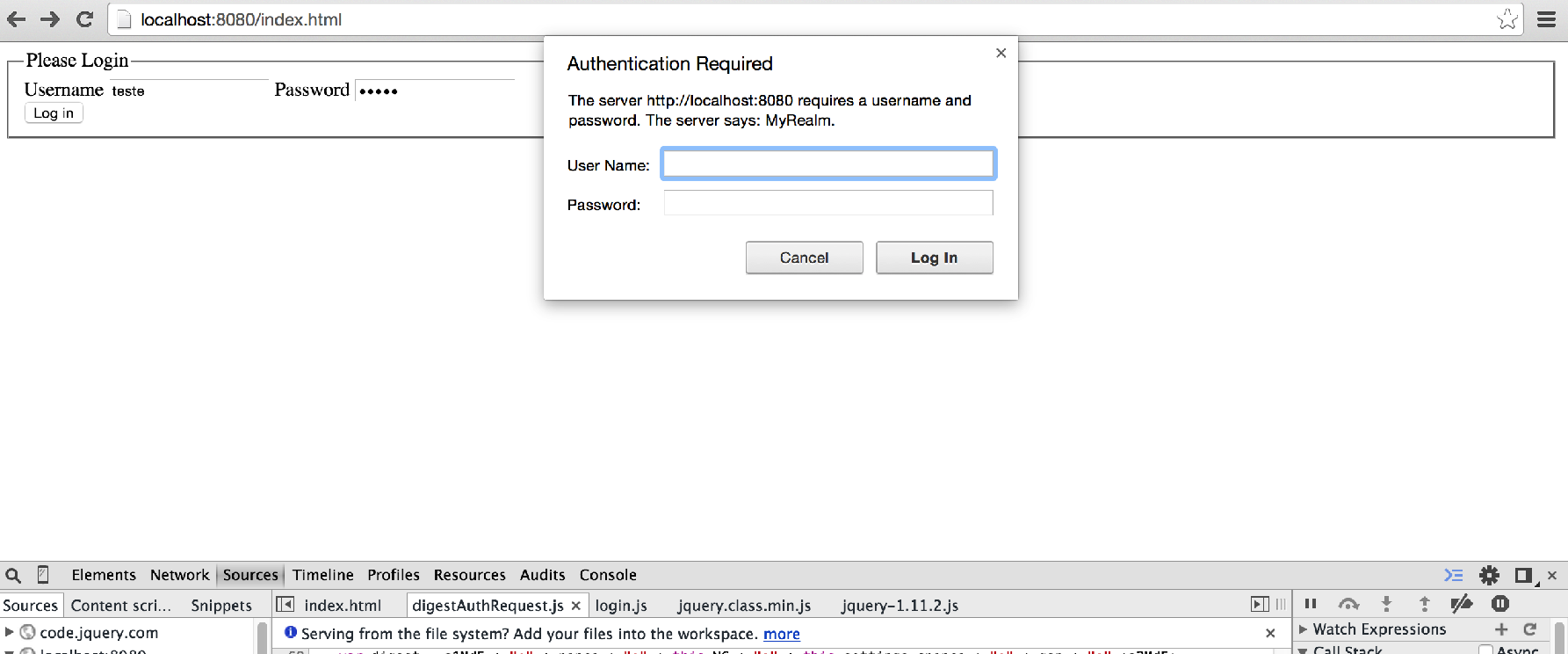
Como contornar isso? No mesmo post do Marcin Michalski ‘s Weblog ele da uma solução para isso não ocorrer. Estender a classe DigestAuthenticationEntryPoint, o que ele faz é alterar o código de status 401 Unauthorized para 403 Forbidden.
public class AjaxDigestAuthenticationEntryPoint extends DigestAuthenticationEntryPoint{

  @Override
  public void commence(HttpServletRequest request, HttpServletResponse response,
             AuthenticationException authException) throws IOException, ServletException {
    super.commence(request, new UnauthorizedHttpResponse(response), authException);
  }

  private static class UnauthorizedHttpResponse extends HttpServletResponseWrapper{
    public UnauthorizedHttpResponse(HttpServletResponse response) {
      super(response);
    }
    @Override
    public void sendError(int sc, String msg) throws IOException {
      if(sc == HttpServletResponse.SC_UNAUTHORIZED){
        sc = HttpServletResponse.SC_FORBIDDEN;
      }
      super.sendError(sc, msg);
    }
  }
}
Após muita pesquisa para descobrir a melhor forma de contornar este problema, cheguei a uma solução, alterar o HTTP Authentication Scheme. Quando enviamos o HEADER para o cliente, enviamos o tipo de autenticação (Authentication Scheme) WWW-Authenticate: Digest, para que o browser não mostre a caixa de diálogo do login, criaremos nosso próprio Authentication Scheme.
O que precisamos fazer é estender a classe DigestAuthenticationEntryPoint e criarmos nossa própria implementação do Digest. Na verdade usaremos o mesmo código do DigestAuthenticationEntryPoint, mudando apenas o Authentication Scheme de Digest para outro de nossa escolha, usarei DigestCustom.
Dei o nome da classe de RestDigestAuthenticationEntryPoint, veja abaixo como ficou o código:
public class RestDigestAuthenticationEntryPoint extends
		DigestAuthenticationEntryPoint {

	private static final Log logger = LogFactory
			.getLog(RestDigestAuthenticationEntryPoint.class);

	public void commence(HttpServletRequest request,
			HttpServletResponse response, AuthenticationException authException)
			throws IOException, ServletException {
		HttpServletResponse httpResponse = (HttpServletResponse) response;

		// compute a nonce (do not use remote IP address due to proxy farms)
		// format of nonce is:
		// base64(expirationTime + ":" + md5Hex(expirationTime + ":" + key))
		long expiryTime = System.currentTimeMillis()
				+ (super.getNonceValiditySeconds() * 1000);
		String signatureValue = DigestUtils.md5DigestAsHex(new String(
				expiryTime + ":" + super.getKey()).getBytes());
		String nonceValue = expiryTime + ":" + signatureValue;
		String nonceValueBase64 = new String(Base64.encode(nonceValue
				.getBytes()));

		// qop is quality of protection, as defined by RFC 2617.
		// we do not use opaque due to IE violation of RFC 2617 in not
		// representing opaque on subsequent requests in same session.
		String authenticateHeader = "DigestCustom realm=\"" + super.getRealmName()
				+ "\", " + "qop=\"auth\", nonce=\"" + nonceValueBase64 + "\"";

		if (authException instanceof NonceExpiredException) {
			authenticateHeader = authenticateHeader + ", stale=\"true\"";
		}

		if (logger.isDebugEnabled()) {
			logger.debug("WWW-Authenticate header sent to user agent: "
					+ authenticateHeader);
		}

		httpResponse.addHeader("WWW-Authenticate", authenticateHeader);
		httpResponse.sendError(HttpServletResponse.SC_UNAUTHORIZED,
				authException.getMessage());
	}
}
Devemos mudar nossa classe SecurityConfig e trocar a classe DigestAuthenticationEntryPoint pela RestDigestAuthenticationEntryPoint
	@Bean
	public RestDigestAuthenticationEntryPoint digestEntryPoint() {
		RestDigestAuthenticationEntryPoint digestAuthenticationEntryPoint = new RestDigestAuthenticationEntryPoint();
		digestAuthenticationEntryPoint.setKey("mykey");
		digestAuthenticationEntryPoint.setNonceValiditySeconds(120);
		digestAuthenticationEntryPoint.setRealmName("MyRealm");
		return digestAuthenticationEntryPoint;
	}
Também devemos mudar o javascript digest-auth.js, pois o Spring Security não aceitará nosso DigestCustom sem termos que implementar nosso próprio filter, mas não queremos isso, devemos enviar no HEADER, Authorization: Digest.
 generateAuthorizationHeader : function(wwwAuthenticationHeader, response, uri){
   wwwAuthenticationHeader = wwwAuthenticationHeader.replace("DigestCustom", "Digest");
   return wwwAuthenticationHeader+', username="'+this.settings.username+'", uri="'+
      uri+'", response="'+response+'", nc='+
      this.NC+', cnonce="'+this.settings.cnonce+'"';
   }
Pronto, agora estamos usando todo o poder do Spring Security, com autenticação Digest, nos nossos serviços RESTful.
Você pode fazer o download do código fonte aqui
- java (4) ,
- spring (2) ,
- spring-boot (2) ,
- spring-security (2) ,
- spring-data-rest (2) ,
- autenticação (1) ,
- digest (1) ,
- segurança (1) ,
- restful (2) ,
- web-services (1)