
Introdução ao JHipster: Spring Boot + AngularJS
Hoje vou falar um pouco do JHipster ou “Java Hipster” (como os criadores costumam chamar), é um gerador do Yeoman para criação de aplicações modernas em Java, com Spring Boot e AngularJS. Ele possibilita a utilização de tecnologias como Spring Boot, Spring MVC REST, JPA, segurança com Spring Security e bancos de dados como MySQL, PostgreSQL, MongoDB e Cassandra, entre outras.
Em pouco tempo, o JHipster vem se tornando muito popular no Github, e tem sido destaque de revistas online como InfoQ, Infoworld e SD Times, e também em conferências em Paris, Londres, Montreal, Omaha, Taipei , Richmond e Frankfurt.
Instalação
Vamos lá, para instalar o JHipster você precisa do Java instalado, Git e Node.js (para usar o gerenciador de pacotes do node, npm).
- Instalar o Yeoman:
npm install -g yo - Instalar o Bower:
npm install -g bower - Instalar o Grunt:
npm install -g grunt-cli, se preferir pode instalar o Gulp:npm install -g gulp. - E finalmente instalar o JHipster:
npm install -g generator-jhipster
Criando um projeto
Crie um diretório onde ficará o projeto, e dentro do diretório que você acabou de criar, digite o comando yo jhipster.
a saída do comando é igual a abaixo:
 _     _   ___   __  _____  ____  ___       __  _____   __    __    _
| |_| | | | |_) ( (`  | |  | |_  | |_)     ( (`  | |   / /\  / /`  | |_/
|_| | |_| |_|   _)_)  |_|  |_|__ |_| \     _)_)  |_|  /_/--\ \_\_, |_| \
                             ____  ___   ___
                            | |_  / / \ | |_)
                            |_|   \_\_/ |_| \
              _    __    _       __        ___   ____  _      __
             | |  / /\  \ \  /  / /\      | | \ | |_  \ \  / ( (`
           \_|_| /_/--\  \_\/  /_/--\     |_|_/ |_|__  \_\/  _)_)


Welcome to the JHipster Generator

? (1/13) What is the base name of your application? (jhipster)
Após isso é só ir respondendo as questões relativas ao seu projeto. Dependendo da sua escolha, as perguntas podem mudar.
- ? (1/13) What is the base name of your application? mywebapp
Aqui informo o nome da aplicação - ? (2/13) What is your default Java package name? br.com.cadocruz
O nome do pacote padrão no Java - ? (3/13) Do you want to use Java 8? Yes (use Java 8)
Aqui podemos escolher entre usar o Java 8 ou Java 7 - ? (4/13) Which *type* of authentication would you like to use? HTTP Session Authentication (stateful, default Spring Security mechanism)
O tipo de autenticação que vamos usar, as opções são: HTTP Session Authentication, OAuth2 Authentication e Token-based authentication - ? (5/13) Which *type* of database would you like to use? SQL (H2, MySQL, PostgreSQL)
O tipo de banco de dados vamos usar: SQL (H2, MySQL, PostgreSQL), MongoDB ou Cassandra - ? (6/13) Which *production* database would you like to use? MySQL
Como escolhi SQL na pergunta anterior, aqui escolho qual banco usar em produção MySQL ou PostgreSQL - ? (7/13) Which *development* database would you like to use? H2 in-memory with Web console
Aqui semelhante a pergunta acima, mas para o ambiente de desenvolvimento: Aqui inclui a possibilidade de usar o H2 - ? (8/13) Do you want to use Hibernate 2nd level cache? Yes, with ehcache (local cache, for a single node)
Escolho se desejo usar o segundo nível de cache do Hibernate, temos 3 opções: Não, Sim com ehcache (cache local) ou com HazelCast (cache distribuído) - ? (9/13) Do you want to use clustered HTTP sessions? No
Aqui seleciono se desejo usar cluster para as sessões com o HazelCast - ? (10/13) Do you want to use WebSockets? No
Se quero usar WebSockets - ? (11/13) Would you like to use Maven or Gradle for building the backend? Maven (recommended)
Escolho entre Maven ou Gradle - ? (12/13) Would you like to use Grunt or Gulp.js for building the frontend? Grunt (recommended)
Semelhante a escolha acima, esta é para build de front-end. - ? (13/13) Would you like to use the Compass CSS Authoring Framework? No
E a última pergunta é se queremos usar Compass
Após as escolhas, o JHipster irá baixar todos os arquivos necessários para nossa aplicação (este processo pode demorar alguns minutos). Para rodar a aplicação, simplesmente digitamos: mvn spring-boot:run
A aplicação estará disponível em http://localhost:8080
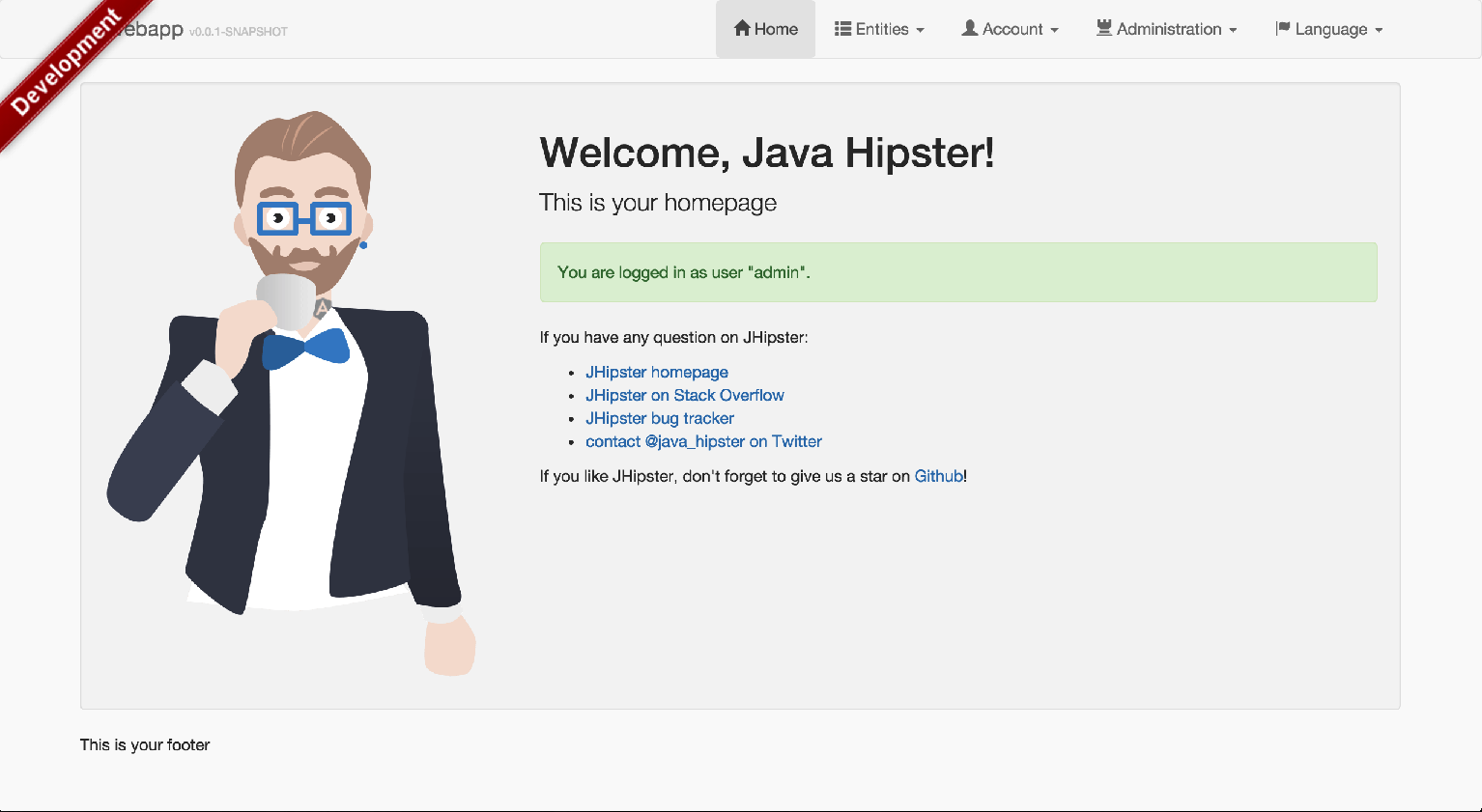
Página inicial
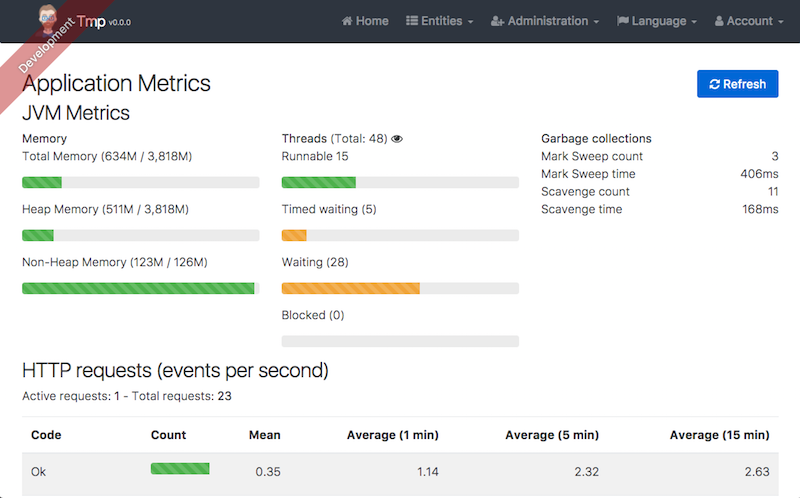
Monitoramento
Gerenciadmento de logs

Internacionalização
O JHipster possui suporte a vários idiomas, por padrão vem instalado apenas inglês e francês. Mas para instalarmos português é simples, digitamos: yo jhipster:languages, procuramos pressionando a seta para baixo ou para cima e selecionamos com a tecla de espaço “Portuguese (Brazilian)”
Languages configuration is starting
? Please choose additional languages to install: (Press <space> to select)
❯◯ Catalan
 ◯ Chinese (Simplified)
 ◯ Chinese (Traditional)
 ◯ Danish
 ◯ German
 ◯ Korean
 ◯ Hungarian
(Move up and down to reveal more choices)
Entidades
Também podemos adicionar outras entitidades. Digamos que queremos criar uma entidade Autor e Livro, para isso precisariamos criar para cada entidade:
- Uma tabela no banco
- Uma JPA Entity
- Um Spring Data JPA Repository
- Um Controller com Spring MVC REST, com as operaçoes basicas de CRUD
- Um AngularJS router, um controller e um service
- Uma página HTML
Se necessitarmos criar relacionamentos, isso se torna ainda pior. Com o JHipster esta tarefa é muito fácil, digitamos no console yo jhipster:entity autor e respondemos algumas questões:
The entity autor is being created.
Generating field #1
? Do you want to add a field to your entity? Yes
? What is the name of your field? nome
? What is the type of your field? String
===========Autor==============
nome (String)
Generating field #2
? Do you want to add a field to your entity? Yes
? What is the name of your field? dataNascimento
? What is the type of your field? DateTime
===========Autor==============
nome (String)
dataNascimento (DateTime)
Generating field #3
? Do you want to add a field to your entity? No
===========Autor==============
nome (String)
dataNascimento (DateTime)
Generating relationships with other entities
? Do you want to add a relationship to another entity? Yes
? What is the name of the other entity? Livro
? What is the name of the relationship? livro
? What is the type of the relationship? one-to-many
===========Autor==============
nome (String)
dataNascimento (DateTime)
-------------------
livros - livro (one-to-many)
Generating relationships with other entities
? Do you want to add a relationship to another entity? No
===========Autor==============
nome (String)
dataNascimento (DateTime)
-------------------
livro - livro (one-to-many)
? Do you want pagination on your entity? Yes, with a simple pager
Everything is configured, generating the entity...
   create .jhipster/Autor.json
   create src/main/java/br/com/cadocruz/domain/Autor.java
   create src/main/java/br/com/cadocruz/repository/AutorRepository.java
   create src/main/java/br/com/cadocruz/web/rest/AutorResource.java
   create src/main/resources/config/liquibase/changelog/20150306164732_added_entity_Autor.xml
   create src/main/webapp/scripts/app/entities/autor/autors.html
   create src/main/webapp/scripts/app/entities/autor/autor-detail.html
   create src/main/webapp/scripts/app/entities/autor/autor.js
   create src/main/webapp/scripts/app/entities/autor/autor.controller.js
   create src/main/webapp/scripts/app/entities/autor/autor-detail.controller.js
   create src/main/webapp/scripts/components/entities/autor/autor.service.js
   create src/test/java/br/com/cadocruz/web/rest/AutorResourceTest.java
   create src/test/gatling/simulations/AutorGatlingTest.scala
   create src/main/webapp/i18n/en/autor.json
   create src/main/webapp/i18n/fr/autor.json
   create src/main/webapp/i18n/pt-br/autor.json
Repare que o JHipster já criou todos os arquivos necessários, nos poupando muito trabalho. Mas ainda precisamos criar a entidade Livro: yo jhipster:entity livro
The entity livro is being created.
Generating field #1
? Do you want to add a field to your entity? Yes
? What is the name of your field? titulo
? What is the type of your field? String
===========Livro==============
titulo (String)
Generating field #2
? Do you want to add a field to your entity? Yes
? What is the name of your field? dataPublicacao
? What is the type of your field? DateTime
===========Livro==============
titulo (String)
dataPublicacao (DateTime)
Generating field #3
? Do you want to add a field to your entity? No
===========Livro==============
titulo (String)
dataPublicacao (DateTime)
Generating relationships with other entities
? Do you want to add a relationship to another entity? Yes
? What is the name of the other entity? autor
? What is the name of the relationship? autor
? What is the type of the relationship? many-to-one
? When you display this relationship with AngularJS, which field from 'autor' do you want to use? nome
===========Livro==============
titulo (String)
dataPublicacao (DateTime)
-------------------
autor - autor (many-to-one)
Generating relationships with other entities
? Do you want to add a relationship to another entity? No
===========Livro==============
titulo (String)
dataPublicacao (DateTime)
-------------------
autor - autor (many-to-one)
? Do you want pagination on your entity? No
Everything is configured, generating the entity...
   create .jhipster/Livro.json
   create src/main/java/br/com/cadocruz/domain/Livro.java
   create src/main/java/br/com/cadocruz/repository/LivroRepository.java
   create src/main/java/br/com/cadocruz/web/rest/LivroResource.java
   create src/main/resources/config/liquibase/changelog/20150306170841_added_entity_Livro.xml
   create src/main/webapp/scripts/app/entities/livro/livros.html
   create src/main/webapp/scripts/app/entities/livro/livro-detail.html
   create src/main/webapp/scripts/app/entities/livro/livro.js
   create src/main/webapp/scripts/app/entities/livro/livro.controller.js
   create src/main/webapp/scripts/app/entities/livro/livro-detail.controller.js
   create src/main/webapp/scripts/components/entities/livro/livro.service.js
   create src/test/java/br/com/cadocruz/web/rest/LivroResourceTest.java
   create src/test/gatling/simulations/LivroGatlingTest.scala
   create src/main/webapp/i18n/en/livro.json
   create src/main/webapp/i18n/fr/livro.json
   create src/main/webapp/i18n/pt-br/livro.json
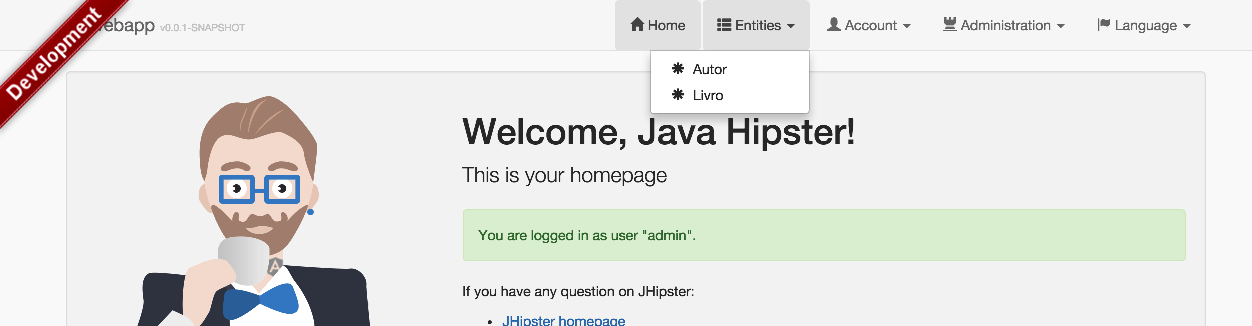
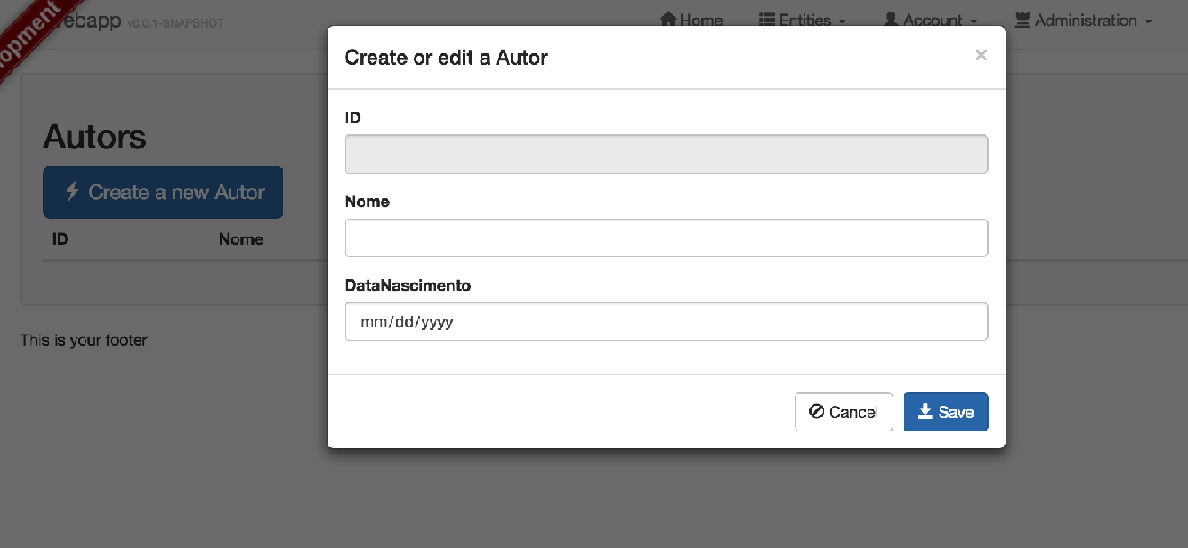
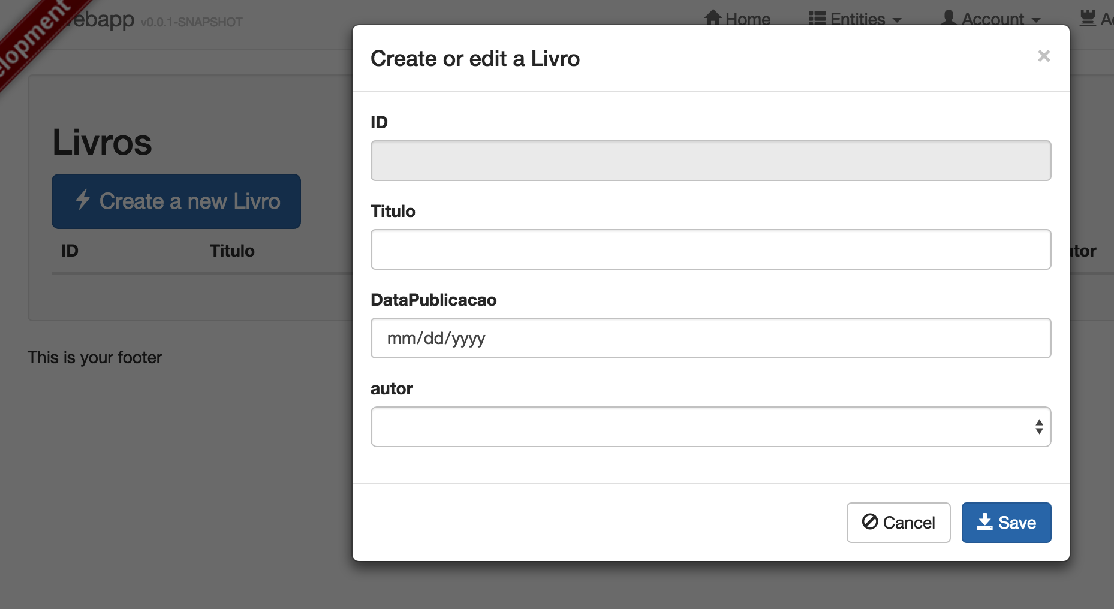
Subindo novamente a aplicação podemos ver que nossas entidades foram criadas com as operações básicas de CRUD.
Services
Caso queira criar Services (para sua regra de negócio) o JHipster também tem um comando específico para isso: yo jhipster:service [nome da service].
Conclusão
Apesar de ser um projeto novo, o JHipster possui várias funcionalidades interessantes que facilitam a criação de Web Apps usando Spring Boot e AngularJS.
Enquanto eu escrevia este post, saiu a nova versão (2.5.2) do JHipster, com várias correções de bugs, confira o Release notes
- jhipster (1) ,
- yeoman (1) ,
- angularjs (1) ,
- java (4) ,
- spring (2) ,
- spring-boot (2) ,
- spring-security (2) ,
- spring-data-rest (2) ,
- restful (2) ,
- web-app (1)